 SciGalaxy Tutorial
Import your records
Which export to download from each database so SciGalaxy can build the network you want.
SciGalaxy reads Web of Science plain text, Scopus CSV, CNKI, Wanfang, CSSCI, and PubMed, and it can search OpenAlex directly. Parsing happens in the browser. The file is not uploaded. Duplicate records are dropped.
After the upload, check the field summary. If the cited-reference column is almost empty, co-citation and bibliographic coupling are turned off. Keywords, authors, and institutions still work.
Web of Science
- Select the records in your hit set.
- Export a plain text file.
- Set the record content to Full Record and Cited References. Without cited references, document, author, and journal co-citation, and bibliographic coupling, are unavailable.
- Web of Science allows 500 or 1,000 records per download, depending on your institution. Export in batches and drop every txt into SciGalaxy together.
The usual filename is savedrecs.txt. Several batches belong in one project.
Scopus
Export a CSV with every field selected, especially the cited references inside the citation block. A bibliography-only CSV can still make keyword and collaboration networks. It cannot make co-citation or coupling.
- Select the records and choose Export.
- Choose CSV.
- Select all field groups: citation information, bibliographical information, abstract and keywords, and the remaining options on the form.
- Drop the file into SciGalaxy.
A Web of Science file and a Scopus file can share one project. The import page can merge the two and line up reference strings.
CNKI
Export Refworks.
CNKI does not include cited references. Document co-citation, author co-citation, journal co-citation, and document, author, and journal coupling are unavailable. Use keyword co-occurrence, terms, author collaboration, and institution collaboration instead. Country collaboration and subject categories work when those fields are present.
Leave Chinese encoding checked on import.
Wanfang
Export Refworks, the same way as CNKI. The file has no cited references, so co-citation and coupling are unavailable. Use keywords, authors, and institutions.
CSSCI
Download the tagged plain text. You should see fields such as 【来源篇名】, 【来源作者】, and 【参考文献】. This export includes cited references, so co-citation is available. Leave Chinese encoding checked.
PubMed
Save the PubMed / MEDLINE format. The file is usually .nbib or .txt, and the records contain lines that start with PMID-.
PubMed has no cited references. Co-citation and coupling are unavailable. Use keywords, authors, and institutions.
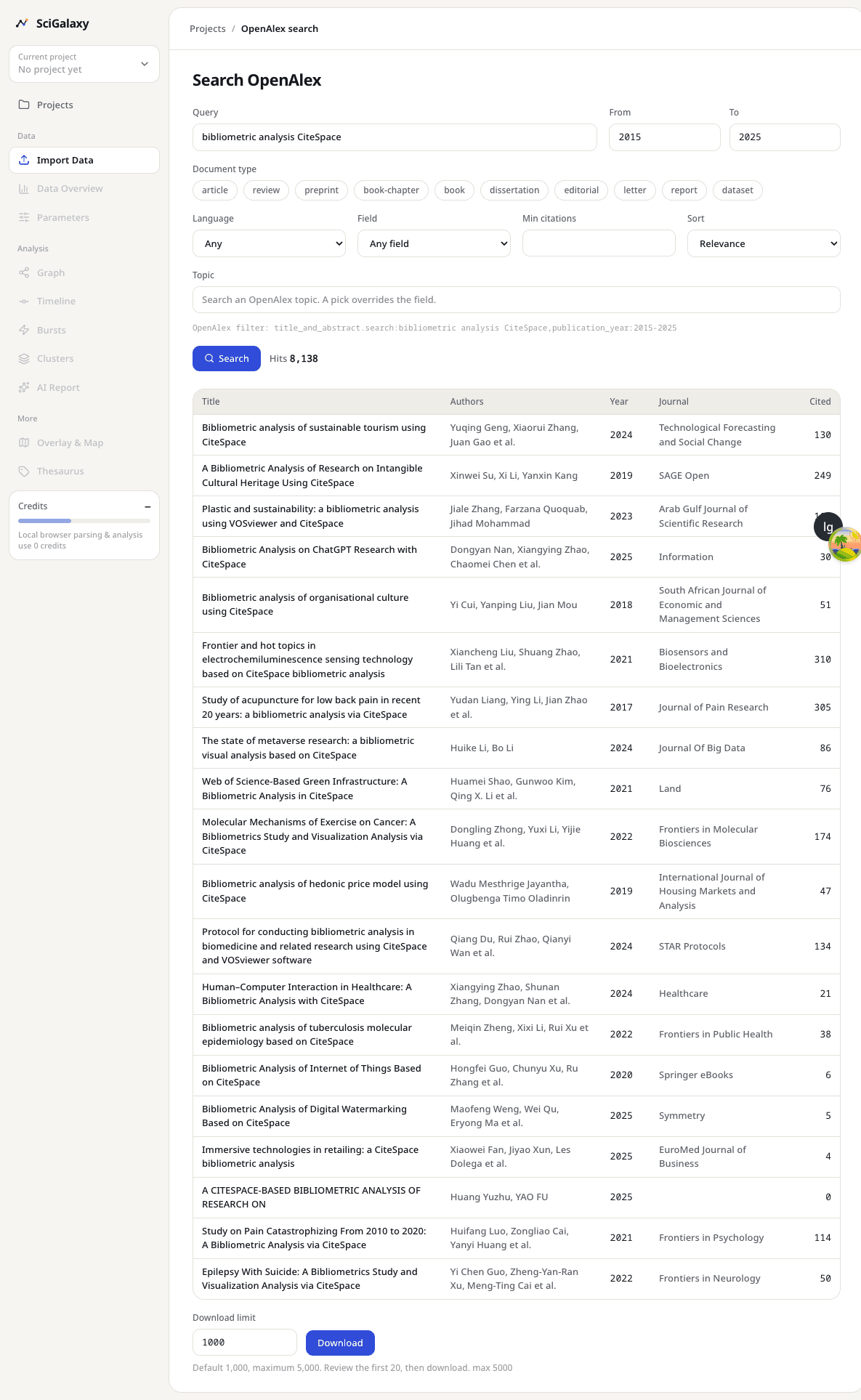
OpenAlex search
You do not download a file first. From the project page, open Search OpenAlex. The query box accepts AND, OR, and quoted phrases. You can also limit year, document type, language, field or topic, a minimum citation count, and the sort order.
Read the hit list before you download. OpenAlex records include cited references, so co-citation and coupling are available.
Search uses credits. Until pricing is published, you can try it free of charge.
Citation expansion
Citation expansion pulls more records out from a project you already have. It uses credits as well, and it is free to try until pricing is published. The project must contain OpenAlex work ids. Sample projects and projects downloaded from OpenAlex search qualify. A plain Web of Science or CNKI file without those ids cannot be expanded.
- Backward collects the works your records cite.
- Forward collects the works that cite your records.
- Both does the two directions.
- Seeds can be the most-cited records, or every record.
- You can take one layer, or a second layer, and set a cap on each layer.
The download becomes a new project.
Move a CiteSpace project
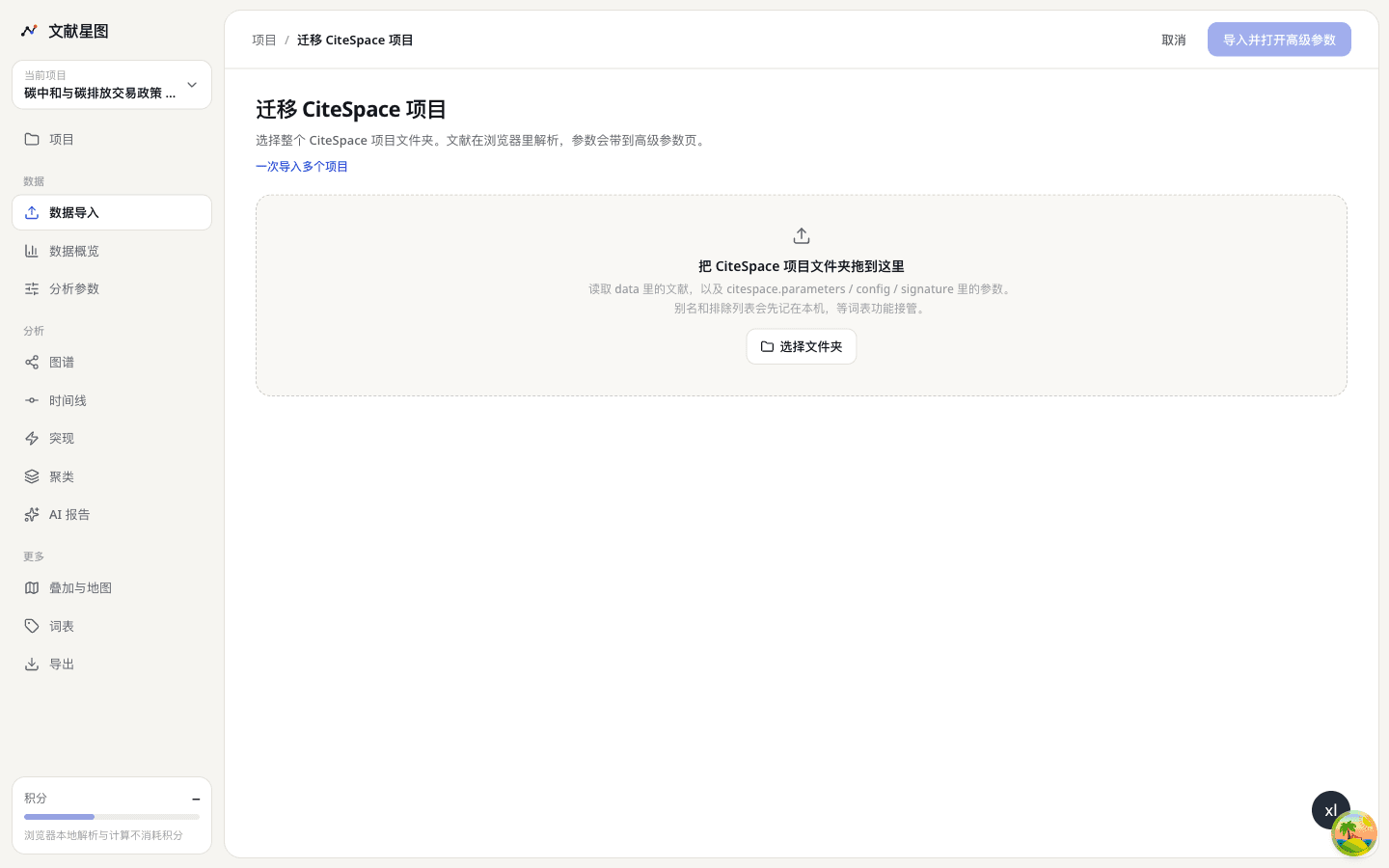
A CiteSpace project folder can move across as a whole: the records, the parameters, and the alias and exclusion lists. Choose the project folder, not a single txt inside it.
SciGalaxy reads the records under data, and the parameters in citespace.parameters, config, and signature. Aliases and exclusions come with them. Parsing still happens in the browser. You land on the advanced parameters page with the time slices, g-index, pruning, and node type already filled in.
If the folder has no parameter file, and the records have cited references, the default is document co-citation with g-index and k = 25.
When the import finishes, go to One-click analysis. If the file has no cited references, the three goals that need them stay hidden.